 Betonmixer
Professional DJ mix editor.
Studio mixes, radio shows and podcasts, set preparation for live play.
Windows 10/11 x64 · macOS 13.3+ (Apple Silicon)
PRO
The mix builds itself
Analysis marks INTRO, DROP and BREAKDOWN sections in every track. When tracks are added to the tracklist, the program lays them out into a mix at once: DROP2 of the outgoing track is aligned with DROP1 of the incoming track, and default volume and bass automation is drawn on every transition. Transitions can be auditioned a minute after the tracks are loaded.
Eight library tracks added to an empty project and laid out into a mix with transitions.
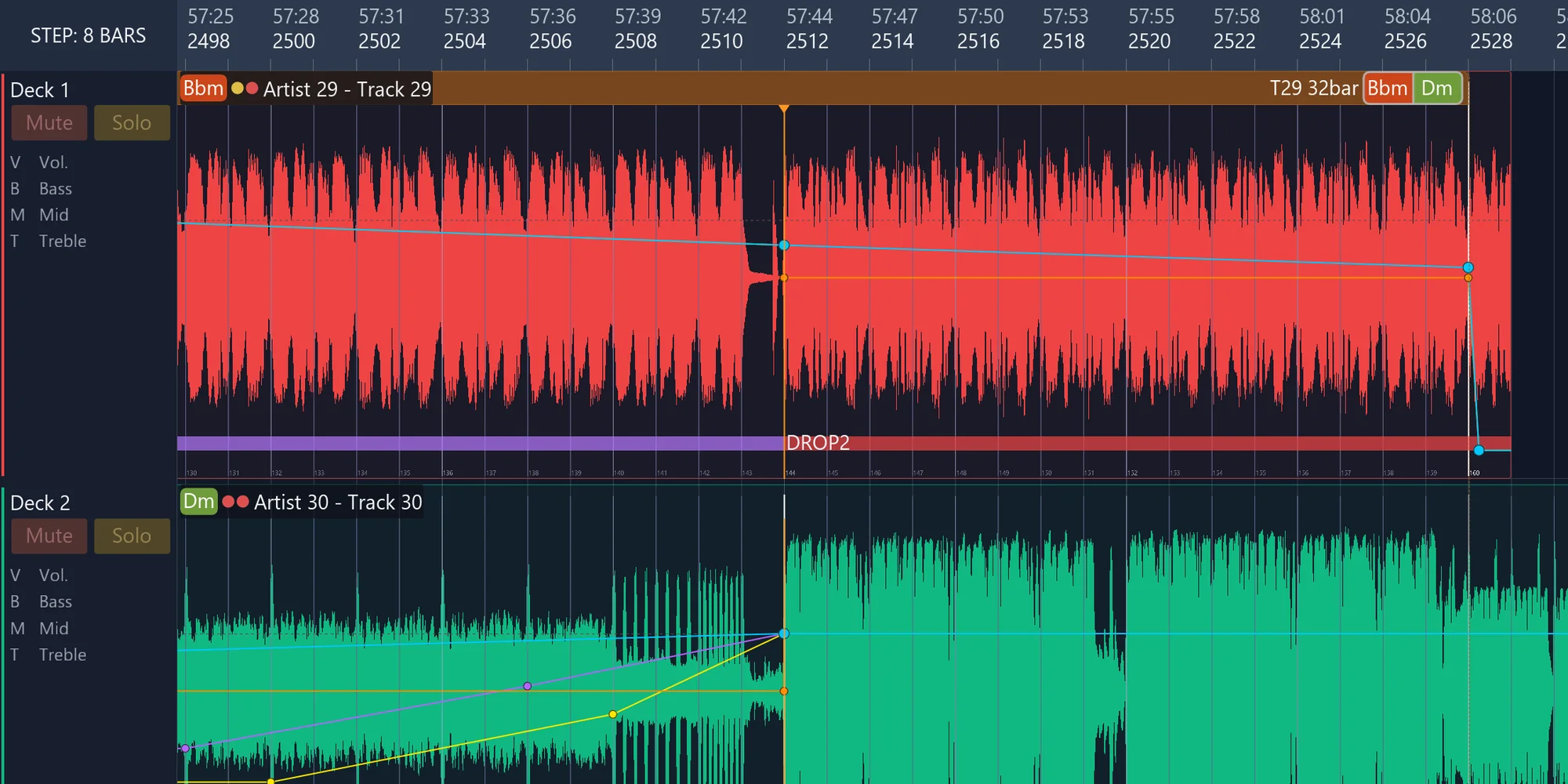
Transition after a track is added: DROP2 of the outgoing track and DROP1 of the incoming track on one mix cut. Mid and high curves of the incoming track were added by hand.
Workspace
Automation points are placed with the V, B, M and T keys at the cursor: volume, bass, mids and highs. Time snaps to the beats of the track grid; level snaps to the levels of neighbouring points.
Automation around the mix cut and nested magnets
The automation of both tracks around the mix cut forms a figure. With Ctrl held on grab, the figure moves together with the mix cut. Magnets are nested: the track body edge carries the transition frame edge, the frame edge carries the edge fade, the frame holds the figure. Points that reach the frame edge stack on it vertically and are not deleted.
Mix cut without Ctrl: the figure stays. With Ctrl: the figure moves with the mix cut.
Mix tracklist
A click on the Key column sorts the whole mix into a harmonic sequence. Unlocked transitions are rebuilt; locked chains are kept.
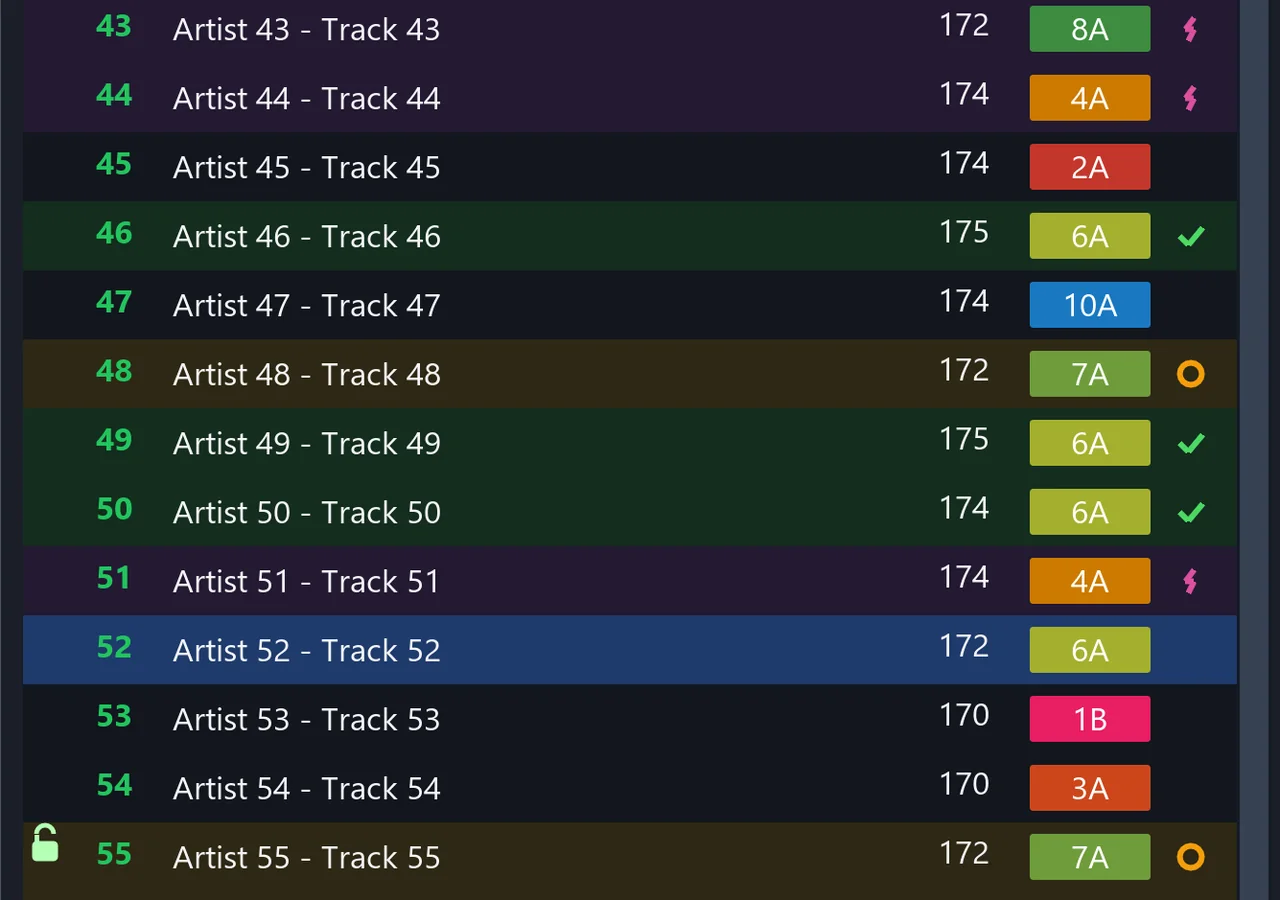
Compatibility marks relative to the selected track.
Compatibility
Hints by key, energy and mood: exact match, smooth transition, energy lift, mood change, incompatible. The F key leaves only compatible tracks in the tracklist.
Search
By title, artist, file name and key, in musical or Camelot notation.
Chains PRO
A lock fixes a transition. Consecutive locked transitions form a chain that cannot be broken by accident when tracks are moved or sorted. A chain gets a name, is saved to the library and inserted into another mix, adapted to its Master BPM.
Beatgrid editor
The grid is set from the hit under the orange anchor with one SET GRID button. Mix positions stay on their bars; the audio shifts under the grid. Drops and breakdowns are set with SET DROP and SET BRKDWN.

Automatic cue points PRO
Hot cues A-D and memory cues are placed automatically from the first drop. RECALC CUE re-places them from the current markup.
Markup check
Unconfirmed markup is labelled "not checked". Confirmed markup is not overwritten by background analysis or import.
Vinyl drift compensation PRO
A vinyl rip is aligned to the track grid: drift is measured on drum hits, the result is written to a new file next to the original.
Library
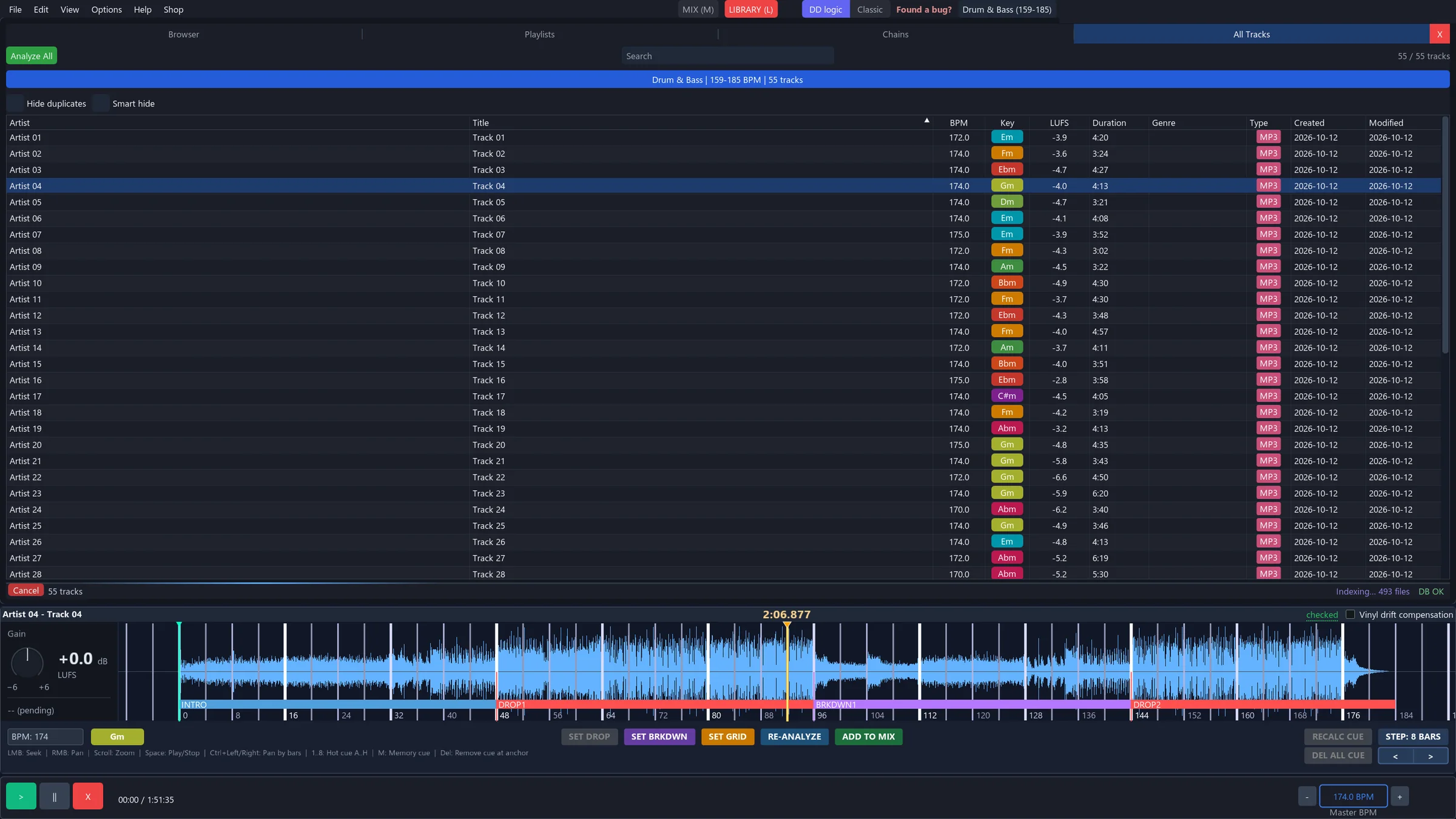
Folder scanning and drive tree, favourites, playlists and collections, saved chains, all tracks grouped by genre BPM ranges. BPM, key and LUFS columns, batch analysis, import of DJ libraries and M3U.
Hide duplicates PRO
The filter removes files that are already in the current mix. Smart hide also hides every version of such a track: the original file and everything rendered in place from it, including versions of versions.
PRO
Pair Mode
A candidate from the quick library is placed between two neighbouring tracks with a ready transition and Double Drop; a loop plays its entry. This makes it fast to audition candidates and find the track that fits the transition perfectly. The Fit column shows the candidate's compatibility with both neighbours.
PRO
Normalization and auto-mastering
Track normalization
All tracks of the mix are brought to one LUFS target, measured on the drop. The Gain knob in the beatgrid editor sets a per-track offset on top of the automatic one.
Auto-mastering
Two master section modes: Neuropunk master and Smart clipper. Auto measure sets the master input from the loudness of the whole mix. The mix sounds even, loud and dense regardless of the source tracks.
Metering
Loudness per BS.1770-4 and EBU Tech 3341, ceiling on true peak.
The TRACK NORMALIZATION checkbox above the MASTER fader turns normalization on and off for the whole mix.
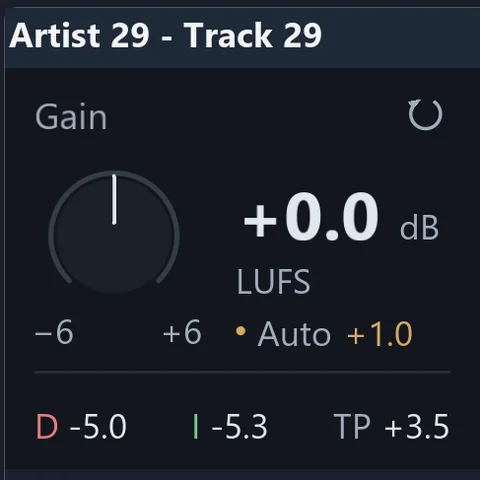
Track Gain knob and the automatic normalization offset (Auto).
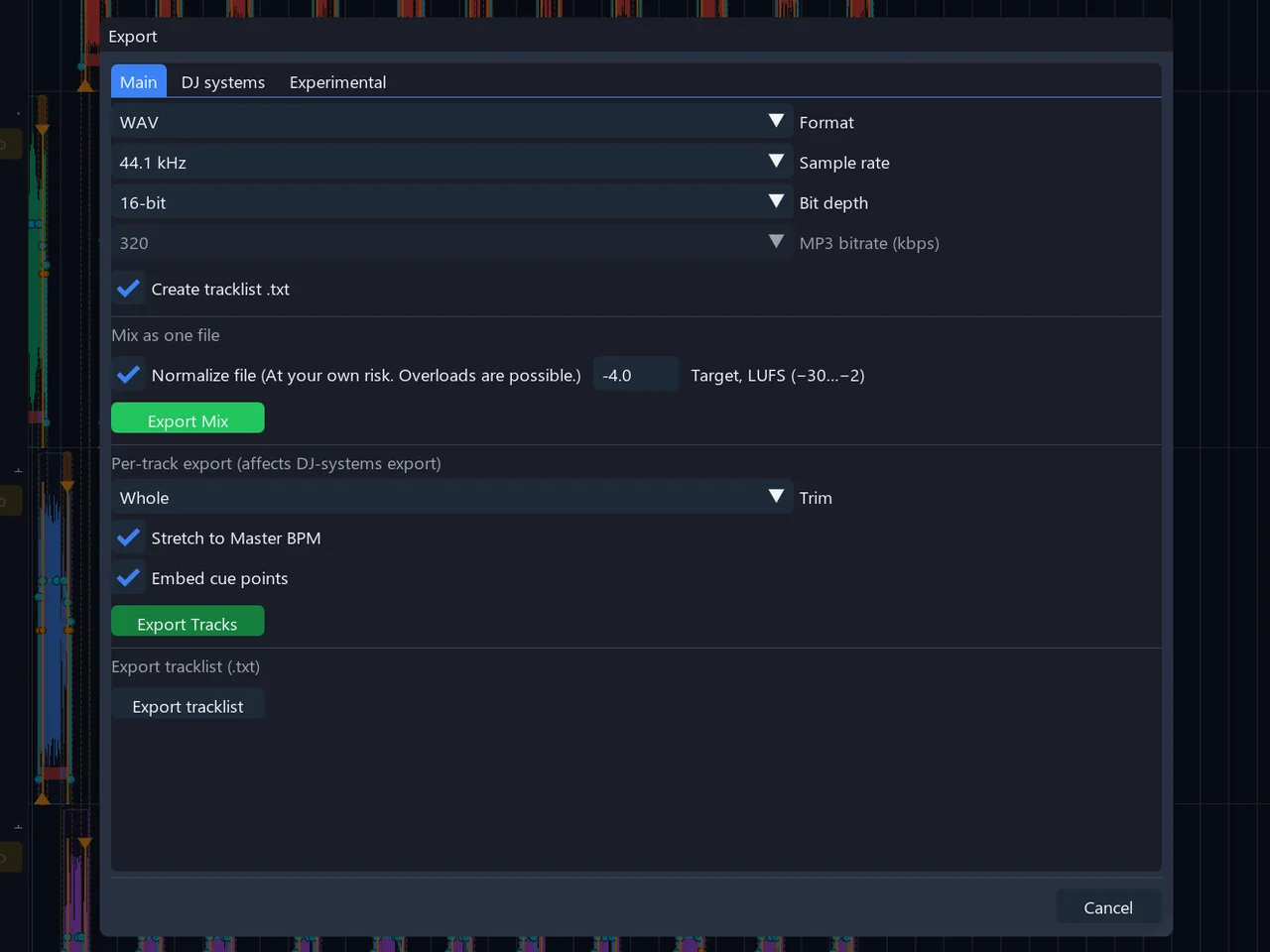
Export
- The mix as one file
- Set for DJ software: playlist in mix order with cue points
- Individual tracks, whole or trimmed
- Tracks stretched to one Master BPM
- Tracks normalized to one LUFS target
The render window counts true-peak overs and marks them on the waveform.
System requirements
No powerful computer is needed. The interface is drawn by the graphics card; track analysis and mix rendering are spread across CPU cores. On a slow computer only the analysis of added tracks and the render take longer.
System
Windows 10 or 11, 64-bit. macOS 13.3 or later on Apple Silicon (M1 and newer). Windows 7, 32-bit systems and Intel Macs are not supported.
Processor
Any 64-bit CPU. More cores mean faster analysis and rendering.
Graphics
A driver with OpenGL 3.3 support. Integrated laptop graphics are enough.
Memory
8 GB recommended. When memory runs short, the app reads tracks from disk during playback instead of holding them whole.
Disk
The app takes about 25 MB. The analysis cache is about 350 MB per thousand tracks; its folder can be moved.
Pricing
FREE
The full editor. Mix cut by hand.
- Manual mix-cut editing
- Volume, bass, mids and highs automation
- BPM and key detection
- Tracklist, locks and chains in the project
- Beatgrid editor, library, export
- Full tag editor and converter
- Advanced hot and memory cue tools
- 7-day PRO trial
PRO
The automation. Forever.
- INTRO / DROP / BREAKDOWN sections: detection and editing
- Mix building on drops, Double Drop
- RECALC CUTS, edge magnet, automation follows the frame edge
- Pair Mode
- Track normalization and auto-mastering
- File normalization on export
- Vinyl drift compensation, RECALC CUE
- Chains in the library, hide duplicates
Paying from Russia? Pay in rubles · questions by email
Frequently asked
Is this a replacement for Rekordbox / Serato / Traktor?
No. Rekordbox, Serato, and Traktor are live tools for realtime performance only. Betonmixer is balanced software: a professional editor for finalising studio mixes and, at the same time, finding tracks for live mixes plus marking them up. Our export works in your live software - grid and markers preserved. You can also import your libraries from Rekordbox, Serato and Traktor into Betonmixer.
How is this different from other auto-mix apps?
Auto-mix software is mostly built for entertainment: stems, effects, video, integrations with everything. Betonmixer is built to professional standards while staying approachable for beginners: genre-aware logic, accurate BPM and key detection, broadcast-grade master output (BS.1770-4 LUFS + stereo-linked true-peak), sample-accurate MP3 decoding. Fewer features for hype and sales - more quality mixes.
I mix fine in a DAW. Why do I need Betonmixer?
A DAW is too broad a tool, built for production - which is exactly why an hour of mix costs a week there: you line up tracks by hand, hunt for BPM, stretch, draw automation by hand, swap one track and the whole mix tail collapses and everything has to move again by hand. Betonmixer is a specialised machine: coupled tracks that never drift apart, automatic transition recalc, section detection and ready automation on every transition. The same job in an evening - mastered to industry standards on the way out.
I used to run MixMeister. Is this it?
In spirit - yes: a timeline mix editor. But MixMeister hasn't been updated in many years. This is its modern offspring and reimagining. Here you get neural key detection, genre-aware BPM, drop and section detection, BS.1770-4 LUFS mastering, Rekordbox / Serato / Traktor export, convenient playlist and library workflow - and active development.
What exactly is free, and what is PRO?
FREE is the full editor: unlimited mix length, timeline with 4 decks, manual volume/EQ automation, genre-aware BPM + neural key detection, beat-grid editor, library + quick audition sidebar, Rekordbox/Serato/Traktor import and export, clean WAV export - no watermarks or time limits. PRO adds automation on top: section detection, smart cut placement on drops, double-drop logic, LUFS normalization, pair mode + quick transition search, transition presets and chain bundles.
Is there a trial?
Yes - 7 days of full PRO, activated from inside the app. Starting the trial needs an internet connection; one trial per machine. When it ends the app falls back to FREE - nothing breaks, your projects stay in place.
Will my license ever expire?
No. PRO is a one-time payment. Lifetime license + all future updates. No subscriptions. One key - 2 machines; move by deactivating the old one.
Which operating systems are supported?
Windows 10/11 x64 and macOS 13.3 or later on Apple Silicon (M1 and newer); it won't run on Intel Macs. Linux is in development. The engine is native C++ (Dear ImGui + OpenGL front end), sample-accurate by design, no Electron.
Refunds?
14 days, full refund.
What if the auto-detector got my track wrong?
I'm constantly improving the detection algorithms. But if it happens - open the beat-grid editor and fix it. The moment you touch BPM, grid, or sections by hand, the track gets userVerified = 1 and becomes inviolate. No automatic re-analysis, re-detection, snap-to-grid, or batch operation is allowed to overwrite it.
About the author
Yevgeny Besman (DJ Bes). Drum & bass DJ and producer, 30 years in the profession. Founder of Neuropunk and Gydra. More than 200 music releases.
Neuropunk podcast
Running since January 2007. The most popular drum & bass podcast in the world by number of streams.
Neuropunk ecosystem
Labels, festivals, an academy, a production centre, booking, a line of monitor headphones.
Gydra
A duo since 2014, more than 130 releases. European Drum & Bass Awards: Best Album, Best Producer, Best Track.
Stage
Over 25 years Neuropunk has brought more than two thousand drum & bass artists to the stage.